Hello and welcome!
Thank you for choosing the Gokaku Nihongo speaking program.
Our goal is to make your Speaking program launch process as smooth as possible, and we’ve provided as much guidance as we can in this document. If you ever need clarification or extra support, please feel free to contact us anytime — we’re here to help you succeed.
About Gokaku Nihongo Speaking program
LINK: ☺️ Why is Gokaku Nihongo Irodori Study so good? And who is it for?
[Table of Contents]
Program Understanding
1.1 Program design for your speaking program
1.2 Speaking program delivery methodCourse Assignment Design
Student Classification — "Team" & "Class"
Progress Monitoring & Management
Required Roles & Members
Contract & Lead Time
Required Steps Before Launch
Launch Message Template
1. Program Understanding
1.1 Program design about your Speaking program
Before starting, clarify:
Will this be a new speaking class or added to existing courses?
What is the main purpose? (e.g., master speaking course or supplemental education to JFT/ JLPT courses)
How effective do you want the program to be? (e.g., must-learn-by-deadline vs. slow and leisurely pace)
How many Speaking courses per week do you want students to complete?
1.2 Speaking program delivery method
Decide how students will use the Speaking Course content:
- Self-study on smartphone — Students complete lessons at their own pace. This is the common delivery method.
In the classroom — Teacher-led practice and live evaluation. We can handle it.
Hybrid — Self-study + in-class review/discussion.
2. Course Assignment Design
Select the Speaking program courses for your classes.
Decide:
Assign all courses at once (students can work ahead).
Or assign gradually by letting students self-register via Group Key .
Reference:
Please see the available Gokaku Nihongo Speaking program courses
LINK: [Gokaku Nihongo Speaking program courses]
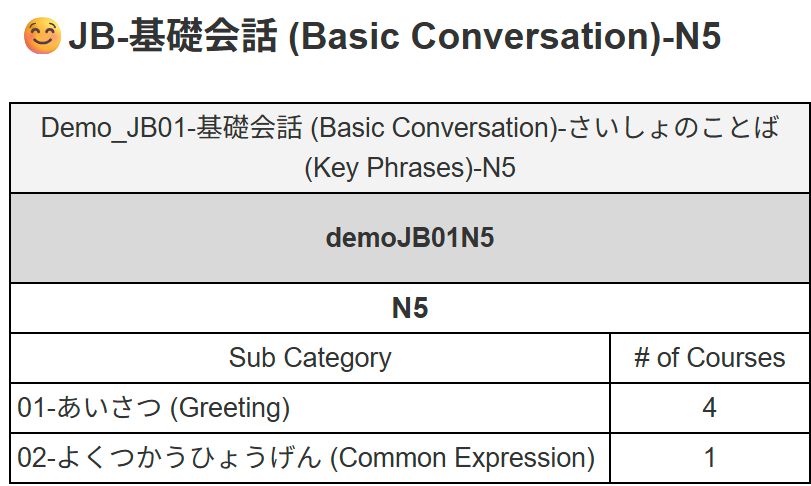
Speaking courses are offered by a group.
For example, the group below offers the total of 5 (4+1) speaking courses for the one subject.
3. Student classification — "team" & "class"
IMPORTANT - A student can have 2 classification tags. "Team" and "Class". These tags will be visible in Report.
"Team"
- 1st tag to define a student.
- It can be an instructor's name (ie. Ms Mary), batch name (ie. Batch_17), or any other convenient tags.
"Class"
- 2nd tag to define a student.
- Used together with “team” to organize students in more detail.
Tips:
- Proper use of teams and classes makes your Reports capable to segment the data by "team" and "class"
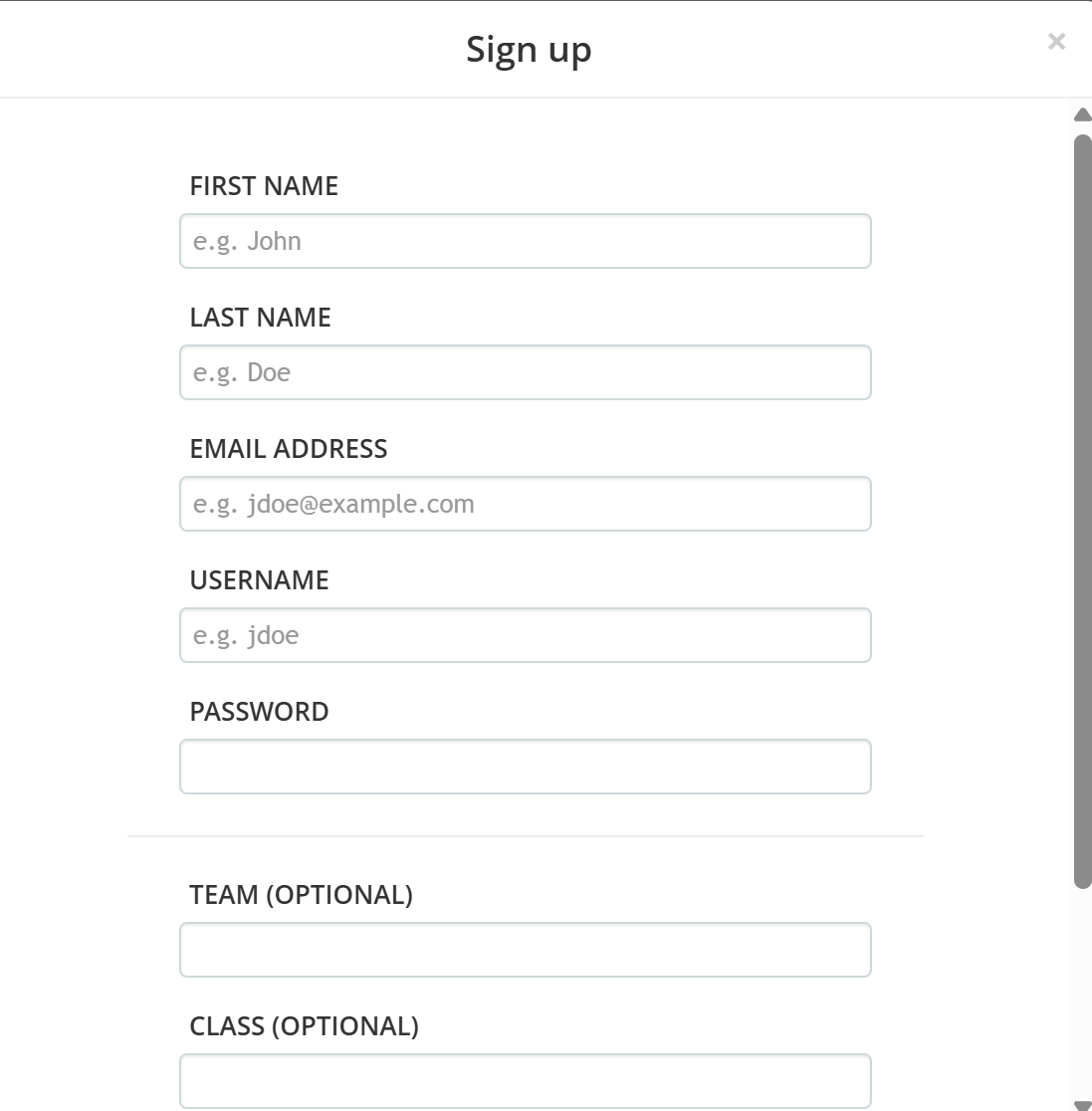
- Both "team" and "class" can be entered when a student signs up for their accounts.
- If you inform students in advance which values to enter (see below image) , it will help keep the student data organized
.
4. Progress monitoring & management
Once your course assignments are in place, monitoring progress becomes simple:
Use the Gokaku Nihongo Training Matrix Reports to check who completed which courses.
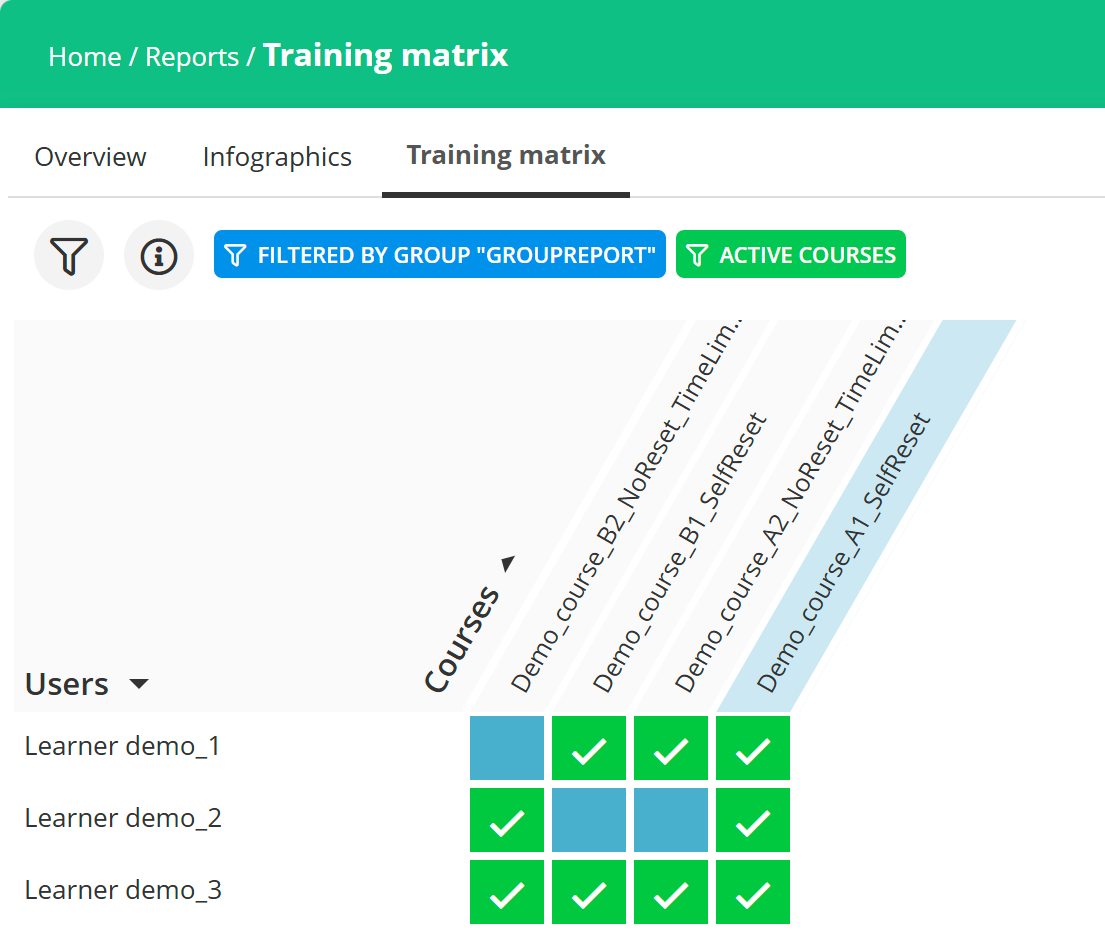
- Easy and real-time monitoring helps you identify which students need extra support and follow ups.
- The monitoring and follow up are the easiest and most important key to the success for your students.
Recommendation for status monitoring:
We recommend holding a weekly internal status meeting to review the status and agree on follow-up actions.
Gokaku Nihongo Launch Support ❤️:
Our team will help you set up this weekly meeting and will attend the 1st meeting to ensure your start strong.
5. Required roles & members
Assign clear responsibilities before launch:
Administrators
Approve new student accounts.
Assign students to the courses or groups
However, If you have students use Group keys for self-registration, administrators will not need to manually assign each student for their courses. It saves a lot of work.
Keep the number of administrators small — all admins can approve newly signed-up students, so this role should be limited to those managing admissions.
Link: [Administrator Manual]
Instructors
Basically, cannot manage the students course assignments.
Monitor and provide feedback to encourage students.
LINK: [instructors's Manual]
6. Contract & lead time
Plan for the minimum time required from signing the contract to full launch: 1–2 weeks
Build portal site (your https://XXXXX.manabu.gokaku-nihongo.com with SSL certification): ~1 week
Communicate with students about the program and sign in activities : 1 day – 1 week
Classroom launch: typically 1 day
Remote launch: may require additional time up to 1 week
7. Required steps before launch
Ensure these steps are completed in order:
Finalize program design (Steps 1–5 above)
Sign the contract
Admin and instructor accounts are provisioned
Portal site is provisioned with custom URL and SSL certification
Send communication to students with sign-in details
8. Launch message template for your students
Prepare one combined message to send to students before launch.
This saves time, avoids confusion, and ensures all key instructions are in one place.
Your message should include:
Notification of the speaking program with the portal URL.
Request to sign in (account approval by school).
Group Key usage guide for self course registration (provided by teacher).
Message template to your students for Speaking program launch
(works for email, WhatsApp, or LINE):
Title: Welcome & Getting Started – Speaking Program
Welcome to the Speaking program at [School Name], powered by Gokaku Nihongo.
You can access your online learning portal here:
https://XXXXX.manabu.gokaku-nihongo.com
Please follow these steps to get started:
Bookmark the portal URL so you can access it easily anytime.
Sign in to the portal using your email address.
Your account will be approved by the school before you can start learning.
? [Account Sign-in guide]Once logged in, use Group Keys to register the required courses
Your teacher will give you the correct Group Key for your class.
? [How to use Group Keys]
If you have any questions or need help signing in, please contact your teacher.
We look forward to supporting your Japanese speaking practice!
Thank you for your time and effort in reading this guide — you’re now ready to get started!
We look forward to supporting your Japanese speaking program.
If you have any questions or need help, please contact us anytime.
この記事は役に立ちましたか?
それは素晴らしい!
フィードバックありがとうございます
お役に立てず申し訳ございません!
フィードバックありがとうございます
フィードバックを送信しました
記事の改善におけるご協力ありがとうございます。