Hello!
Once you launch Gokaku Nihongo program (Speaking, JFT, JLPT, Mock Tests, or any other programs),
we highly recommend holding a Weekly Status Meeting regularly with your administrators and instructors.
Why? Because regular status meetings keep communication constant and follow-ups timely.
It helps your students stay motivated and feel supported, which leads to better learning outcomes.
At the weekly status meeting, you can see exactly how your students are progressing —
to recognize those doing well and those who need extra help — for your team to know whom to contact and what to communicate.
How to Run Your Weekly Status Meeting
Here’s a simple process and a few tools you can use to run your Weekly Status Meeting.
Once you get used to the flow, feel free to customize it to fit your program and team.
Steps:
1) Check the overall status
2) Check the group status quickly by Training matrix
3) Check the group status with "team" and "class" tags
4) Action: Identify good students
5) Action: identify students who need follow ups
You can see the following sections for more detailed information about each Step.
1) Check the overall status
You first check your students' over all status with student identification tags of "team" and "class"
This step gives you a full picture of who’s active, who’s on track, and who may need help.
Here is how you check the overall status
LINK: [How to check overall students' status with "team" and "class" tag]
If you’re not familiar with these tags or need to organize them first, here’s a guide to setting them up.
Read: [Organizing Your Students Effortlessly with "Team" and "Class" Tags]
2) Check the specific group status quickly by Training matrix
This is the fast and easy way to see how an entire group is doing at a glance.
It’s quick and easy, but note that it doesn’t display “team” and “class” tags.
LINK: [Check the progress of Group (e.g., JLPT Practice, Irodori, etc.) – (Training Matrix)]
3) Check the specific group status with "team" and "class" tags or Group Report
If you want to combine group progress with “team” and “class” detail, use the Group Report instead.
LINK: [Check the progress of Group (e.g., JLPT Practice Questions, Irodori, etc.) – (Report - Group)]
4) Action: Identify good students
By analyzing the below sample Training Matrix report, you can instantly spot good students.
Example (see below chart): Learner Demo_3 has completed all assigned courses —
a clear sign of consistent effort and achievement.
Reward these students with positive feedback.
It will help keep their motivation high and reinforce good learning habits.
5) Action: identify students who need follow ups
Use the same below Training Matrix report to quickly spot students who are falling behind.
Example (see below chart): Learner Demo_1 has many “Not started,” “In progress,” and “Not passed” statuses —
a sign they may be struggling or disengaged.
Follow up promptly with these students—
to understand their challenges and offer targeted support — can help get them back on track before the gap widens.
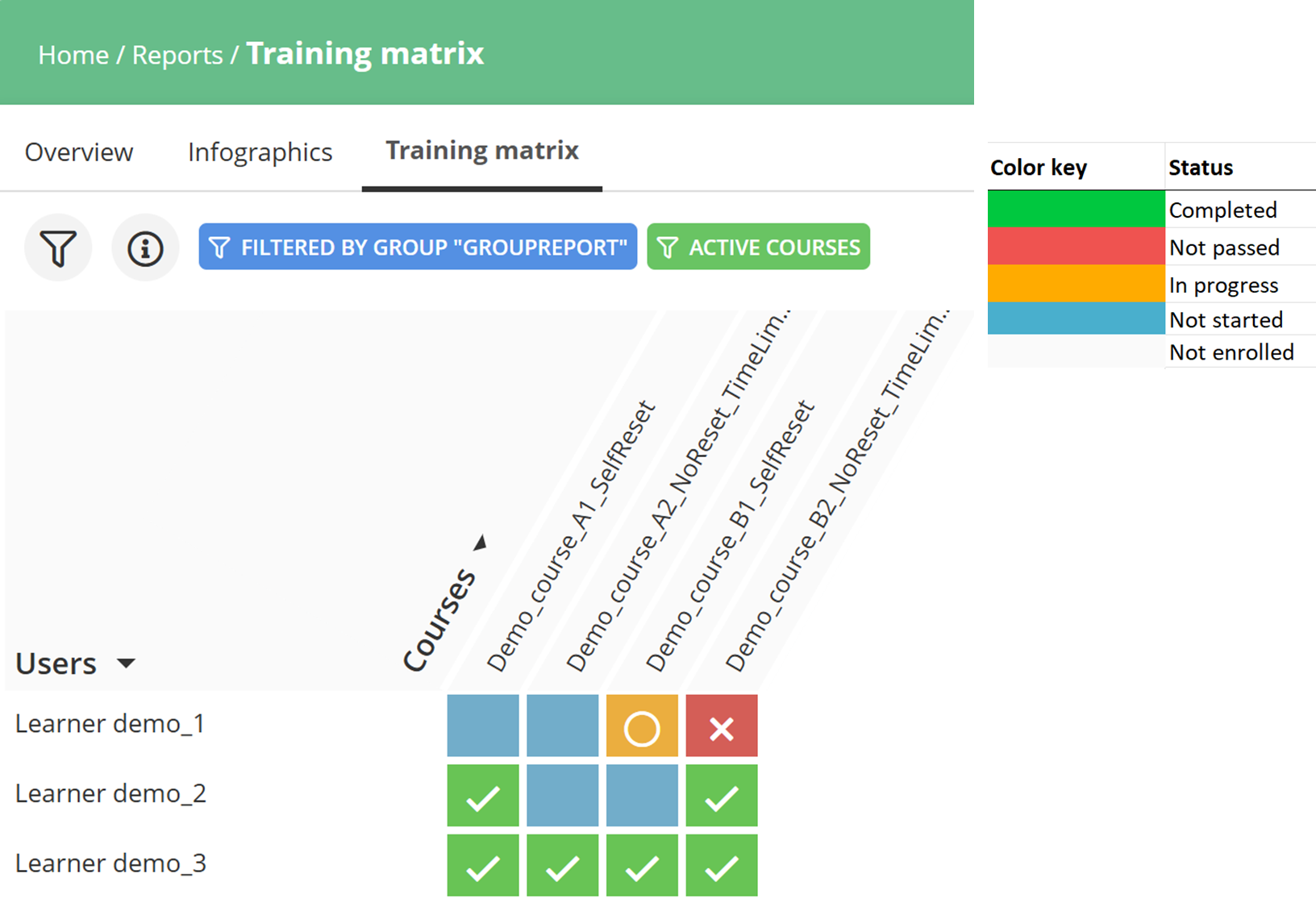
Now you know exactly who to follow up with and why.
One good idea is to keep a simple communication log of each follow-up
so you can track results and see which actions make the biggest difference.
Over time, you’ll spot patterns that help you refine your approach —
making every student feel supported and keeping their motivation high.
Small actions, done regularly, lead to great results — 継続は力なり.
A little follow-up each week paves the path for success.
この記事は役に立ちましたか?
それは素晴らしい!
フィードバックありがとうございます
お役に立てず申し訳ございません!
フィードバックありがとうございます
フィードバックを送信しました
記事の改善におけるご協力ありがとうございます。