Hello and welcome!
Thank you for choosing the Gokaku Nihongo JFT Mock Test program.
Our goal is to make your JFT mock test launch as smooth and effective as possible.
We’ve prepared detailed guidance to help you roll it out quickly and meaningfully —
from clear evaluation to early preparation strategies.
Of course, if you need extra support or clarification at any point, feel free to reach out —
we’re here to help you and your students succeed.
About Gokaku Nihongo JFT Mock Test
LINK: ☺️ Why is Gokaku Nihongo JFT Mock Test so good? And who is it for?
[Table of Contents]
Program Understanding
1.1 What is the JFT Mock Test program?
1.2 Delivery method
1.3 JFT Mock Test ScheduleCourse Assignment & Setup
Student Classification — “Team” & “Class”
Progress Monitoring & Early Evaluation
Required Roles & Members
Contract, Setup & Launch Lead Time
Required Steps Before Launch
Launch Message Template
1. Program Understanding
1.1 What is the JFT Mock Test program?
Before launching, let’s clarify your program details:
- Main goal - We assume it is to pass a JFT Basic exam. We will guide you how to achieve it.
- Type of launch – Is this a new mock test initiative or part of your existing SSW or other Japanese courses?
- Pace & urgency – Will this be a last-minute “must-win” session, or a structured monthly JFT test practice?
- Timing of first test – When will students take their first mock test to establish a performance baseline and guide their study plans?
1.2 Delivery method
Choose how the mock tests will be delivered — the method you choose can impact the integrity of the scores:
Mobile self-study / self-administration by smartphone
Pros:Very flexible — students can take tests anytime, anywhere on their smartphone.
Minimal or no physical setup required.
Cons:Scores may be less reliable due to possible outside help or some form of cheating.
No control over test conditions (noise, time limits, reference materials).
Classroom setting
Pros:Instructor-monitored for fair conditions and high integrity of the test results.
Easier to simulate the real JFT test environment.
Cons:Requires a classroom, students’ physical attendance, and scheduling.
Less flexible for students with varying availability.
Hybrid
Pros:Balances flexibility and score integrity.
In-class review ensures feedback and correction of weak points.
Cons:Still relies partly on self-administered results.
Requires coordination between self-study and class review sessions.
1.3 JFT Mock Test Schedule
We deliver 4 new JFT mock tests on the 1st day of each month:
1 test – available for 1 month
3 tests – available for 2 months
Because of this schedule, students will always have 7 active JFT mock tests available at any given time.
This approach keeps a constant supply of practice material while ensuring older tests are gradually rotated out.
Read: [Four JFT Mock Tests Monthly - Up to Seven Mock Tests Available for Learners]
2. Course Assignment & Setup
Decide your mock test assignment procedure:
Manual assignment – Administrators assign mock test modules to all students instantly.
Best for: Classroom or lab setting where you need high integrity of scores and want to control access timing.
Self-registration via Mock Test Center – Students enroll themselves; saves time for administrators.
Best for: Mobile self-study, where students can take tests anytime, anywhere on their smartphone.
Tip:
If you need high integrity of the score, use manual assignment.
Only if your delivery method is smartphone and anytime / anywhere, use Mock Test Center (self-registration).
3. Student classification — "team" & "class"
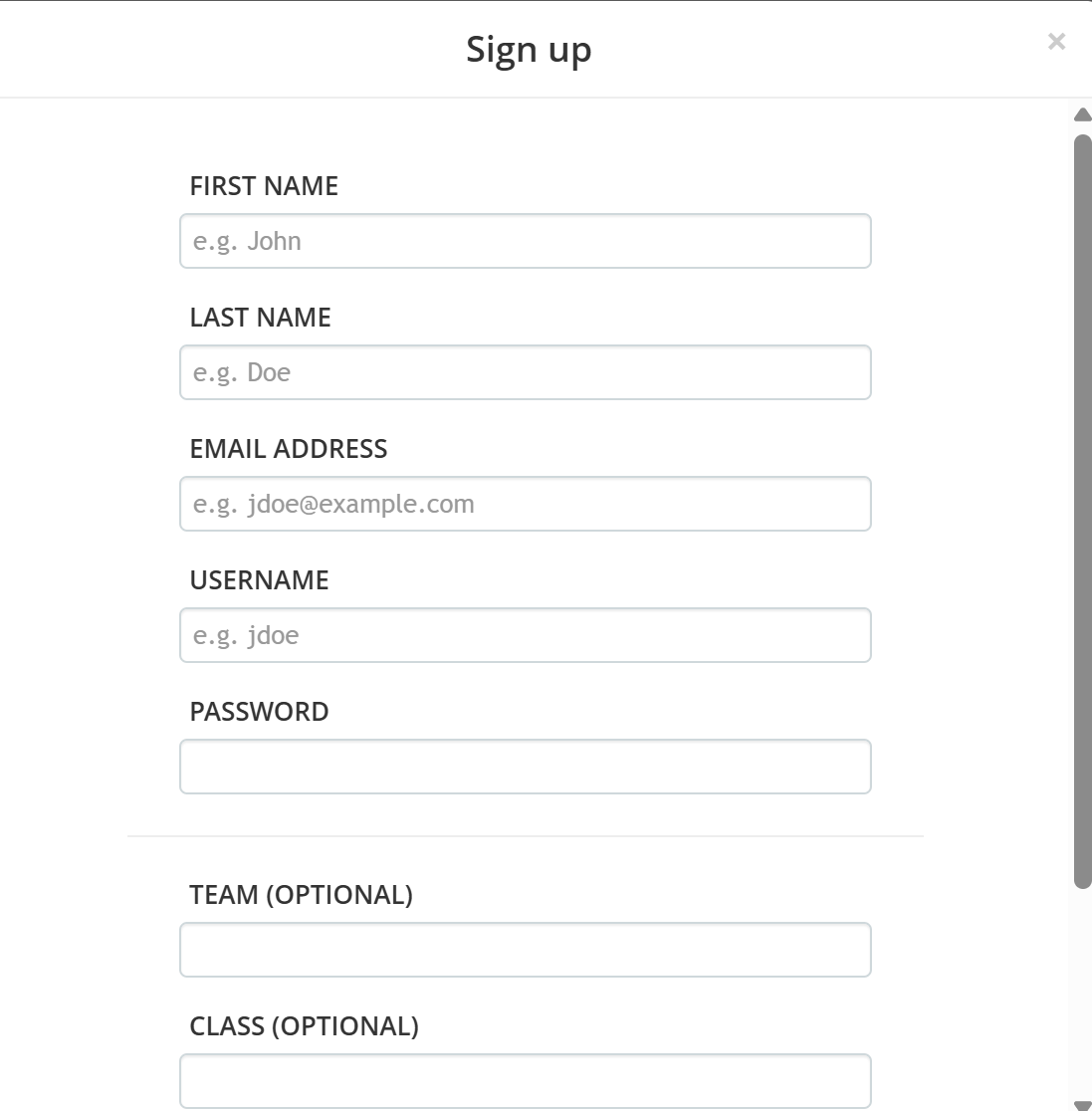
IMPORTANT - A student can have 2 classification tags. "Team" and "Class". These tags will be visible in Report.
"Team"
- 1st tag to define a student.
- It can be an instructor's name (ie. Ms Mary), batch name (ie. Batch_17), or any other convenient tags.
"Class"
- 2nd tag to define a student.
- Used together with “team” to organize students in more detail.
Tips:
- Proper use of teams and classes makes your Reports capable to segment the data by "team" and "class"
- Both "team" and "class" can be entered when a student signs up for their accounts.
- If you inform students in advance which values to enter (see below image) , it will help keep the student data organized
.
4. Progress Monitoring & Early Evaluation
Once mock tests assignment procedure and schedule are in place, monitoring progress becomes simple:
View a report for one mock test for all users
View one student for all the mock tests the student has taken
? Don’t Miss This — Weakness Analysis
Use this powerful tool to identify class-wide weaknesses.
The insights will help you adjust teaching plans and maximize student improvement.
LINK: [Analyze class-wide weaknesses in learners' mock test]
Recommendation for status monitoring:
We recommend holding a weekly internal status meeting to review the status and agree on follow-up actions.
While the mock test schedule is monthly, Gokaku Nihongo has multiple mock tests and other supplemental contents (IRODORI study and JLPT biweekly practice) as your support for students.
Gokaku Nihongo Launch Support ❤️:
We’ll join your first meeting to ensure the setup and early evaluation go smoothly.
5. Required Roles & Members
Define these roles for the launch:
Administrators
Approve accounts and enroll students or distribute group keys.
Only Administrators can assign mock tests with students
However, we recommend to keep admin roles limited for students' enrollment management.
Instructors
Monitor test results, motivate early testing, and guide students on next steps after each mock test.
6. Contract, Setup & Launch Lead Time
Plan for a quick and efficient launch:
From contract to full launch: typically 1–2 weeks.
Setup your custom learning portal (e.g., https://XXXXX.manabu.gokaku-nihongo.com): ~1 week.
Send communications and allow students to log in: 1 day to 1 week.
Mock test launch (mobile or remote): within 1 day once setup is finalized.
7. Required Steps Before Launch
Ensure the following are completed before going live:
Finalize program design (Steps 1–5 above)
Sign the contract
Admin and instructor accounts are provisioned
Portal site is provisioned with custom URL and SSL certification
Send communication to students with sign-in details
Encourage students to take the first mock test early
8. Launch Message Template
Use this ready-to-send message to introduce the JFT mock test program:
Message template to your students for JFT Mock Test program launch
(works for email, WhatsApp, or LINE):
Subject: Join JFT Mock Test Program
Welcome to the JFT Mock Test program at [School Name], powered by Gokaku Nihongo.
We are starting our JFT Mock Test program, smartphone-based, true to the JFT Basic format,
with 4 new mock tests every month to help you get ready for the actual exam.
How to start:
Sign in using your email (admin accounts will be approved prior to your first login).
[if you select "self-study] Register for mock tests using "mock test center"
Select and take a mock test from "Mock Test Center"Take your first mock test.
If you have any questions, need help logging in, or can't find your Group Key, please contact your instructor right away.
We’re here to support your success
Thank you for your time and effort in reading this guide — you’re now ready to get started!
We look forward to supporting your JFT Mock Test program.
If you have any questions or need help, please contact us anytime.
この記事は役に立ちましたか?
それは素晴らしい!
フィードバックありがとうございます
お役に立てず申し訳ございません!
フィードバックありがとうございます
フィードバックを送信しました
記事の改善におけるご協力ありがとうございます。